Crtl+Shift+A
or
On the home ribbon Groups there is an on\off button that turns blue for on.
Friday, January 23, 2015

Tuesday, January 6, 2015
AutoCAD was installed and removed but thinks it is still installed
CREATE A SYSTEM RESTORE POINT
AutoCAD was installed and removed but thinks it is still installed.
Find and delete these windows installer keys. The keys might not match
exactly. They started with 7D, 2F, 57. You can
tell they are AutoCAD related.
(BACKUP YOUR REGISTRY, CREATE A SYSTEM RESTORE POINT unless you feel lucky)
Look for something like this and then do a find for the version you want to uninstall:
Delete the entire 7D key.
[HKEY_LOCAL_MACHINE\SOFTWARE\Microsoft\Windows\CurrentVersion\Installer\UserData\S-1-5-18\Products\7D2F3875000B9040102000060BECB6AB\InstallProperties]
Power Users -You can search the registry for AutoCAD and delete keys that you fell comfortable deleting. Look for keys that look exclusively AutoCAD.


Change page setup i multiple drawings in AutoCAD-Purge, Bind, Check and fix errors
http://knowledge.autodesk.com/support/autocad/troubleshooting/caas/sfdcarticles/sfdcarticles/How-to-change-the-page-setup-inside-multiple-drawings-in-AutoCAD.html
Type DWGCONVERT > Conversion Setups > Modify > Check Replace page setups >
This command could be used to change multiple or many files with these commands: Purge, Bind, Check and fix errors
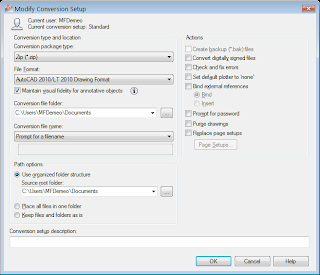
Type DWGCONVERT > Conversion Setups > Modify > Check Replace page setups >
This command could be used to change multiple or many files with these commands: Purge, Bind, Check and fix errors

Wednesday, December 10, 2014
Display driver stopped responding and has successfully recovered. AutoCAD causes display driver to crash and restart
AutoCAD crashes Display driver amdkmdap stopped responding and has successfully recovered. AutoCAD causes display driver to crash and restart
Go into the bios, go under video, and uncheck or disable video switching. Intel driver and the AMD were not working together properly. Once you do this only the AMD driver will run.
Go into the bios, go under video, and uncheck or disable video switching. Intel driver and the AMD were not working together properly. Once you do this only the AMD driver will run.
Tuesday, December 9, 2014
Convert P&ID to AutoCAD drawings, PID "P and ID" Can't copy proxy objects
Convert P&ID to AutoCAD drawings
1.0
If you have a P&ID file and you cannot copy
the P&ID proxy objects you will need to do the following.
1.1
Install and open P&ID. Try to install
the version the files were created in.
1.2
If you have the project files open the
project, if not start a project and import the file.
1.3
Use the –EXPORTTOAUTOCAD command on the
file.
1.4
Open the new file and convert it to the
correct version of AutoCAD if necessary.
Tuesday, November 11, 2014
Printing in Toledo Toledo BluePrint
3601 plotter cartage 1160W
Toledo Blueprint
Toledo Blueprint, 6949 Wales Rd, Northwood, OH 43619
toledoblue.com
(419) 661-9841
Toledo Blueprint
Toledo Blueprint, 6949 Wales Rd, Northwood, OH 43619
toledoblue.com
(419) 661-9841
Friday, November 7, 2014
Excel copy to end of data in column
Click in the cell you want to copy to the end of the data in the column. You will see a little black box in the lower right hand corner of the cell, double click the little black box. That's it.
Subscribe to:
Posts (Atom)